

Ace Translator is a practical software tool that translates texts among 91 of the most popular languages. Since the program uses online translation services, it requires an active Internet connection to perform its job. Moreover, Ace Translator includes advanced features like text-to-speech support for 46 languages and automatic language recognition for the source text.
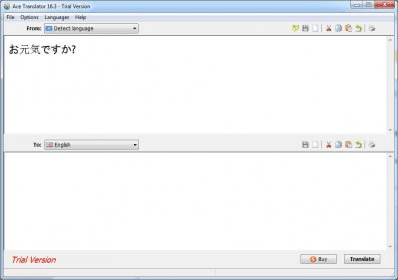
The program's user interface is really simple and easy to use. Basically, it offers you two panels, one for the source text and another for the translated text. As for the source text, you can type it, paste it, drag it from other apps or get it automatically extracted from a text, HTML or PDF file. Then you can select the source language from the list - or let the program detect it automatically for you -, and select the destination language. Alternatively, you can also set the source/destination language pair using a very practical menu the program provides. Among the languages you can select for both the source and the destination texts are English, Spanish, French, German, Dutch, Portuguese, Italian, Arabic, Chinese (both traditional and simplified), Finnish, Greek, Hebrew, Hindi, Irish, Japanese, Korean, Latin, Polish, Russian, Norwegian, Thai, Turkish and many others.
Ace Translator offers you other powerful functions besides text translation, as I mentioned before. For example, the text-to-speech feature allows you to listen to both your source and translated texts and save their audio streams as MP3 files, though not all the languages are supported. Besides, you can save your source and translated texts as plain text or HTML files, copy them or print them. Furthermore, the automatic language recognition is a very powerful and helpful feature of the program, as it allows you to successfully translate a text bloc, even if you don't know what its source language is.
As you can see, Ace Translator is a very simple yet powerful translation tool that includes helpful advanced features. Unfortunately, I would say it is a bit pricey compared with other translators available on the market. The $106.43 license cost is given on a per-user basis.





Comments (2)